

Knowledge Base
Frequently Asked Questions
- Will an antenna work at my location?
With the right antenna in the right conditions, the answer is very often “Yes”. Mohu is here to help! The most accurate way to find out if a TV antenna will work for you is to allow us to perform a free signal analysis at your location. Just shoot us an email with your address at support@gomohu.com or give us a call at 1-877-825-5572. If you want to see for yourself where the TV channels in your area are coming from, use our TV for FREE tool or Antenna Point app to see where your local broadcast towers are and what channels you get.
- How do I run a channel scan?
In order to watch free TV signals broadcast from TV towers in your area, you will need to do a channel scan on your TV once your antenna is connected. Once the scan is completed, you will see what channels you receive in your area.
After you connect your antenna to your television by plugging the antenna’s coaxial cable into the TV, use your TV’s remote control to scan for channels. Some smart TVs will automatically detect when a TV antenna is connected and complete this step for you. This step can vary greatly since there are so many different brands of television, and no two are the same, so you may need to consult the owner’s manual or reach out to the manufacturer for your specific TV model for additional assistance. An online search with the brand of your television followed by “customer service number” should provide a result for their technical support number or contact information.
Here are generic steps for the channel scan process:
- Typically, you can press the “Menu” button on your remote or navigate to “Settings”.
- Look for your TV’s “Input” and make sure it is set to “Air”, “Antenna”, or “Broadcast” – not “Cable”.
- Next, look for a selection labeled “Auto Program”, “Auto Tuning”, “Channels”, or “Scan” and follow the prompts on your TV to complete the channel scan. This could take a few minutes, depending on the number of TV channels available in your area.
Once the scan is complete, you are ready to enjoy free digital TV signals through your antenna.
- What is "line of sight"?
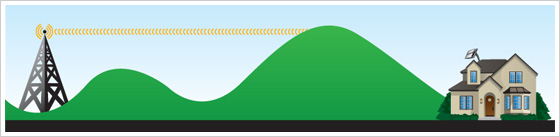
“Line of sight” refers to the space between your TV antenna and the nearest source of over-the-air TV signals, which are transmitted from broadcast towers. If hills or other geographic features are in between the broadcast towers and your TV antenna, you may not be able to receive all the signals available in your area. This is why we always recommend getting a TV antenna as high as your installation requirements will allow, because the goal is always to have the clearest line of sight possible between your TV antenna and the nearest TV towers, so you receive as many signals (and, therefore, channels) as possible. This often means getting the antenna higher than any local obstacles that might be surrounding your home.
- The land around my home is totally flat – how can there be a terrain issue?
Just because when you look outside your window and see nothing but flat land for miles doesn’t mean there isn’t something blocking your TV signals somewhere between your home and the TV towers. Since television signals do not travel through certain terrain obstacles but rather hit the object and stop or are deflected in another direction, a slight rise in the landscape miles away from your antenna can cause reception issues.
- Why do the building materials of my home matter when using an antenna?
Many types of buildings can block reception because of the materials used to construct your home/condo/apartment.
- Stucco and concrete: Metal acts as a barrier that, in essence, traps TV signals and bounces them around, making it difficult for them to “land” on a TV antenna. Since metal mesh or metal rebar is used in these two construction types, an antenna must either be placed in or near a window facing the direction of the broadcast towers, or an outdoor antenna is needed, placed on a roof or as high up as possible, to get the antenna in an optimal position to receive those signals.
- Mobile homes / Aluminum siding: Metal reflects and bounces TV signals around. An outdoor TV antenna or an indoor antenna on the window facing the TV towers is the only option for this type of home. Vinyl siding is OK.
- Metal roofs: The only option for homes with a metal roof is to mount the TV antenna up and over the roof line, so the signals are not reflected away from the antenna. The higher, the better.
- Radiant barriers, Foil lined conduits / duct work, Foil heat shields, Solar panels: All of these will effectively block TV signals from getting to your antenna, so if these are present in your attic, an outdoor antenna mounted on the roof would be necessary.
- My amplified antenna’s reception is getting worse. Can that be fixed?
Yes. If you use a TV antenna with an amplifier and reception has been fine for a while but suddenly becomes “choppy” or “glitchy”, there is most likely an issue with the amplifier, and you should complete an “amp test”.
First, try removing the amplifier: Sometimes, the amplifier can be the issue if signals are strong or close enough that they don’t need amplification. To test this, remove the amplifier completely from the antenna installation (don’t just unplug it – unless you are using our Jolt Switch, in which case simply toggle the amplifier’s switch to the “OFF” position).

Do another channel scan once the amplifier is removed. If you get better reception or more channels without the amplifier, then you may not need an amplifier, or there may be an issue with your existing amplifier, and it needs to be replaced.
If you have determined that you do need an amplifier for your location and you need to replace your existing amplifier, please follow the instructions that best fit your warranty situation.
If you have a Mohu amplifier and are within the 90-day warranty period, please send an e-mail to support@gomohu.com with your name and order number if possible. If you purchased from a third party, please provide us with proof of purchase. Once we have the proof of purchase and mailing information, and have processed the request, we will send a replacement. Delivery generally takes 7 – 10 business days.
If you are outside of the warranty period, you can order a new amplifier here or on Amazon. Our Sales and Service team is also available to assist with purchase over the phone Monday – Friday at 877-825-5572 – we would be happy to place an order for you!
- My TV does not have a coaxial cable port / F-connector; what should I do?
In order to use a TV antenna with a TV that does not have an F-connector port, you will need to purchase a digital converter box. The converter box allows you to connect your antenna to the television via composite cables or a HDMI cable, and has the tuner needed to receive TV signals from your local broadcast towers, which are then “translated” to your TV. Once the antenna is connected to the converter box and the converter box is connected to the TV, all that’s left is to run a channel scan using the converter box’s remote and you’ll be enjoying over-the-air TV for free!
- What is a digital converter box?
Most TVs today have built-in digital tuners which convert over-the-air broadcast television signals to a digital format that can be viewed on the TV. A digital converter box is a separate device which connects to your TV if it does not already have a built-in tuner, allowing it to receive free over-the-air digital TV signals from a TV antenna.
To check if your television has a digital tuner built in, check your owner’s manual or look up the make and model of your television online. Televisions made before 2009 may not have a digital tuner.
Converter boxes can be purchased at most retail electronics stores and online. A digital converter box is a one-time purchase with no monthly fees. One converter box is necessary for each TV that does not have a built-in tuner.
- I have a brand-new TV, will a TV antenna work?
Two things are needed to use an antenna with a TV: a coaxial cable port and an ATSC/digital tuner. A lot of recent smart TVs may detect when a TV antenna is connected and complete a channel scan for you. If you are not sure if your new TV is compatible with a TV antenna, you will need to reach out to your TV’s manufacturer or look in the user manual for your TV.
If you discover that your TV does not have a built-in tuner, all is not lost. You can purchase a digital converter box which connects to your TV via HDMI (or other means – make sure you know which connection type you need before buying). This will allow your TV to receive digital TV signals through your antenna. Go to “What is a digital converter box?” above to learn more.
- Where should I put my antenna in my home?
When you get your antenna, you will need to find the place in your home where your antenna gets the best reception. A general rule of thumb for antenna placement is that the higher you can get the antenna, the better reception will be. You also need to take into account any obstacles between your home and the local broadcast towers, as well as keep your antenna as far as possible from metal objects or structures.
It is best practice to try several locations until you find the spot where you get the most channels and/or the clearest reception. Please remember that every time you move your antenna, you will need to run a channel scan again.
- Which side of the antenna should I display, the black or white side?
Because our antennas are multi-directional, it does not matter which side of our reversible antennas you display in your home if you are using on a wall or shelf. If you are placing the antenna in a window, we recommend facing the white side toward the outside, since the black side would absorb much more heat and potentially harm the antenna over time, and the white side will reflect the sun’s rays and absorb less heat. It is recommended to secure all four corners of the antenna to the window – clear packing tape is fine for this.
- Will an antenna work in an RV?
Since it is likely you will be moving from place to place, it is impossible to tell with absolute certainty how many channels you’ll get or what your reception will be like. However, you may be able to get decent reception in many of your camping locations if there are transmitter towers within range.
Make sure the front of your antenna is pointed toward the broadcast tower locations in your area. Use our TV For FREE tool to find channels and TV towers, or download our free Antenna Point app. Do your best to get the antenna away from metal structures or obstacles and get it as high up as you can. Use a window whenever possible.
You will pick up different channels in different places, and your reception will depend on several things:
- Distance from TV towers (large cities usually have more towers).
- Terrain: If you are in the mountains or in a valley, there may be very few signals or none at all. As always, get the antenna as high up as possible for better reception.
- Metal blocks reception: A windshield/window is going to be the best place for your antenna, since most RVs are largely made of metal. Please note that other RVs (such as your camping neighbors), if made of metal, can also cause reception issues.
- Motion: Watching over-the-air TV while the RV is in motion is likely to cause issues, similar to when you’re listening to the radio, and you drive out of range of the station you were listening to. You will likely get the best results when you are set up somewhere near a city. Signals are broadcast from one stationary place, and you could drive out of range very quickly.
We recommend the Leaf Amplified antenna for traveling. This antenna has a 60-mile range, and you can remove (or simply turn off) the amplifier to accommodate different reception requirements in different locations. Why is this important? If you are travelling from place to place, you may find yourself one day to be somewhere with towers close by, in which case an amplifier could disrupt the reception of your free TV signals, and the next day somewhere with towers farther away, in which case the amplifier would boost your reception and make it more reliable. Remember to scan your TV for channels wherever you go!
One last thing – Water can cause issues with reception sometimes, so if you are trying to pull in signals over a body of water, you could experience a “scattering” effect. This happens when a signal hits water and is bounced away from the antenna.
- Will an antenna work on a boat?
Since it is likely you will be moving from place to place, it is impossible to tell with absolute certainty how many channels you’ll get or what your reception will be like. Water can cause issues with reception sometimes, so if you are trying to pull in signals over a body of water, you could experience a “scattering” effect. This happens when a signal hits water and bounces away from the antenna.
However, you may be able to get TV reception in locations if there are transmitting towers within range. Make sure the front of your antenna is pointed toward the broadcast tower locations in your area. Use our TV For FREE tool to find channels and TV towers, or download our free Antenna Point app. Do your best to get the antenna away from metal structures or obstacles and get it as high up as you can. Use a window whenever possible.
You will pick up different channels in different places, and your reception will depend on several things:
- Distance from TV towers (large cities usually have more towers).
- Terrain: If there are obstacles like mountains or you are in a basin, there may be very few signals or none at all. As always, get the antenna as high up as possible for better reception.
- Metal blocks reception: A windshield/window is going to be the best place for your antenna.
- Motion: Watching over-the-air TV while the boat is in motion is likely to cause issues, similar to when you’re listening to the radio, and you drive out of range of the station you were listening to. Signals are broadcast from one stationary place, and you could move out of range very quickly. You will likely get the best results when you are anchored somewhere near a city.
We recommend the Leaf Amplified antenna for traveling. This antenna has a 60-mile range, and you can remove (or simply turn off) the amplifier to accommodate different reception requirements in different locations. Why is this important? If you are travelling from place to place, you may find yourself one day to be somewhere with towers close by, in which case an amplifier could disrupt the reception of your free TV signals, and the next day somewhere with towers farther away, in which case the amplifier would boost your reception and make it more reliable. Remember to scan your TV for channels wherever you go!
- Will an antenna work in another country?
In theory, yes - if the country has UHF or VHF frequencies, the antenna would be compatible in that country. However, we do not take international orders at this time.
If you purchase an antenna here in the U.S. and bring it with you internationally, this is what you would need to know: The destination country must transmit TV signals using UHF or VHF frequencies. If they use a different standard such as DVB-T2 instead of ATSC, the antenna may not work. Many countries use 220V electrical systems and different plug types than the U.S. If your antenna setup includes an in-line amplifier, be aware that using it with incompatible voltage could damage the device or pose a safety risk. A voltage converter may be required. Lastly, our 1-year product warranty is only valid within the U.S.A.
- How can I improve reception with my Mohu antenna?
Mohu antennas are designed to be placed above and next to your television. A general rule of thumb for any type of antenna placement is the higher you can get it, the better reception you’ll have.
Make sure the front of your antenna is pointed toward the broadcast tower locations in your area. Use our TV For FREE tool to find channels and TV towers, or download our free Antenna Point app.
When you first install your Mohu antenna, be sure to run a channel scan to see how clear your reception is and how many channels you receive. If you think reception can be improved, move your antenna to different locations and scan for channels every time you move or disconnect/reconnect the antenna. In some cases, you may need a longer coaxial cable to get the antenna to a better reception spot. A good quality coaxial cable will work; however, we recommend using no more than 25 ft. of additional cable. Any more than the suggested length of cable could degrade the signal. Less is more when adding coaxial cable.
- I’m installing my antenna in the window; will metal interfere with reception?
Anything metal near the antenna, or between the antenna and the towers it is trying to receive signal from, will interfere with reception. Beware of the following:
- Make sure there are no metal bars on the window where you want to install your antenna.
- Make sure there is no metal bug screen on the window. A vinyl screen is okay.
- If your antenna is placed near a balcony, make sure there is not a metal railing on the balcony.
- If your window is a double-pane metallic auto-tinting glass window, it will block signals. In that case, place your antenna as high as possible on a wall facing the broadcast towers.
Any time you move your antenna, do a channel scan to see if reception has improved. If reception gets worse after moving the antenna and you are certain there is no metal interfering, consider using an amplifier to boost signal reception.
There are some homes where the antenna MUST be placed in or near a window because a wall is not an option. Some examples include:
- Mobile homes
- Homes with aluminum siding
- Homes with stucco siding (metal mesh is used to attach the stucco to the house)
- Apartment buildings or condos in large metro areas, because the metal in surrounding buildings can disrupt signals
A special note about basements: The earth surrounding the basement, while not made of metal, can also block TV signals. If your basement has windows above ground, place the antenna in the window. If that does not provide decent reception, try moving the antenna to a higher point in your home, and running extra coaxial cable to the TV in the basement. Remember to repeat the channel scan every time the antenna is moved or disconnected/reconnected.
- Can I be too close to my TV towers?
Not if you are using a non-amplified antenna. An issue that can sometimes occur when you are using an amplified antenna is poor reception when you are very close to the transmitting towers. The signal from the tower can overpower the amplifier. To determine if this is an issue in your setup and/or try to resolve this, we recommend removing the amplifier and re-scanning for channels. If you have tried this, along with moving the antenna and changing the power source for the amplifier and are still experiencing reception issues, please contact us.
- I live near an airport / freeway – will that disrupt my TV reception?
Unfortunately, the answer is yes. Antenna users that live very close to airports and freeways tend to have issues with spotty reception. Vehicles and airplanes act as moving metal barriers that will reflect/refract TV signals, causing interruptions or poor signal when they pass. In the case of a nearby freeway, the best option is to find a spot in your home to place the TV antenna that will get the antenna up and over the stream of traffic if at all possible.
- I lost my installation instructions. Where can I find new ones?
Please visit our webpage dedicated to assembly and installation instructions for our antennas. If you do not see your antenna on this page, please send a request to support@gomohu.com. Include a picture of the antenna if you do not know the name or model number of your antenna.
- Are Mohu antennas compatible with 4K, 8K, UHD, Full HD 1080p, and NEXTGEN TV?
Absolutely. All our antennas are compatible with the very latest standards in broadcast television.
Fun Fact! Did you know that antenna TV signals are higher quality than cable or satellite TV? That is because free TV signals captured by TV antennas over the air are not compressed like cable and satellite signals are – which need to all fit within the cable lines they use to transmit – so you get the highest resolution and the best sound. Do a comparison and see for yourself!
- Can a Mohu antenna receive 4K content?
A Mohu antenna can receive over-the-air broadcasts, including those transmitted in 4K—if they are available in your area and your TV supports the required technology.
4K refers to a resolution of 3,840 x 2,160 pixels – four times the detail of Full HD. While many TVs now support 4K, the content itself must also be produced and broadcast in 4K to experience the full benefit. Most over-the-air (OTA) broadcasts in the U.S. are broadcast in HD, not 4K. 4K over-the-air broadcasts are made possible by NEXTGEN TV (ATSC 3.0) – a new broadcast standard that provides improved picture, sound, and interactive features. To watch 4K content over-the-air, your TV must have a built-in ATSC 3.0 tuner, and you must be in a market where NEXTGEN TV is available. Mohu antennas are compatible with ATSC 3.0 signals. However, having the right antenna is just part of the setup – you also need a compatible TV and access to stations broadcasting in 4K.
- What is “Cord-Cutting”?
“Cord-cutting” is the process by which cable or satellite customers, frustrated with escalating prices and sub-par customer service, decide to pull the plug on expensive monthly TV bills and switch to watching TV for free with a TV antenna – which is a one-time cost.
- Can I boost signal by using two antennas?
No. Two antennas will not result in a stronger signal and will not enhance results.
- What does “Multi-directional” mean?
“Multi-directional” means the antenna can receive TV signals coming from multiple directions – both the front and back – rather than needing to be pointed directly at a single broadcast tower. Multi-directional antennas help optimize reception, making it easier to place the antenna in your home to get the highest number of local channels.
Think of it like a tennis racket: While you could hit the ball with the frame, you’ll get the best results using the wide, stringed surface – on either side. Similarly, our antennas are designed to pick up signals from the front and back, helping you access more channels no matter where the towers are located around you.
- Do antennas require any subscriptions or monthly costs to use?
NO, not one penny. Buying a Mohu antenna is a one-time cost. Connect the antenna, scan for channels, and enjoy unlimited access to TV from whatever broadcasters are transmitting in your area for FREE!
- Can I use a computer monitor with a TV antenna?
Your monitor would need to have an ATSC tuner built in with a digital visual interface (DVI) to be compatible with a TV antenna.
- What is a sub-channel?
In TV broadcasting, each television station is given a specific channel number and bandwidth. The broadcasting stations are able to transmit more than one independent program at the same time using the same frequency by combining them into one single signal. This is sometimes referred to as “multicasting”.
- Am I using too much coaxial cable?
It is recommended that you use the shortest coaxial cable you can, while still getting your antenna in the best spot to receive clear signals. Less than 25 ft. is the recommended length. Using too much coaxial cable can result in some signal loss, so less is more. Always make sure there are no folds or kinks or coils in the coaxial cable, as this can cause interference as well.
NOTE: If you’re using an amplifier, please remember that any additional coaxial cable should be placed after the amplifier, between the amplifier and the TV, for the best performance.
Troubleshooting
- My TV screen is blank
If you’ve connected your new antenna and you’re not seeing anything on your TV, there are a few possibilities.
- You may have a TV that is not compatible with a digital TV antenna, and you may need to add a digital converter box to your installation.
The first thing to know is the age of your TV. After 2009, all TV signals are broadcast using digital signals, and all our TV antennas are compatible with these digital signals. If your TV was made prior to 2009, you will most likely need a digital converter box. You can: 1) Look in your TV’s manual, 2) Look up the make and model of your TV online and try to find a manual you can download, or 3) Contact the manufacturer of the TV and give them the model number and they will advise you.
What you are looking for is reference to a “digital” or “ATSC tuner”. This indicates your TV has the needed hardware to work with a digital TV antenna. If you see “NTSC”, this indicates that the TV is not digital signal ready, and a converter is needed. Most big box retailers that have an electronics department will stock digital converter boxes.
-
You must verify your TV is set to “Air”, “Antenna”, or “Broadcast” – not “Cable”. Go into the settings or main menu for your TV and verify this input setting is correct. Follow the instructions for your TV’s make and model.
- You may have a TV that is not compatible with a digital TV antenna, and you may need to add a digital converter box to your installation.
- Televisions manufactured before 2009
If your television was made before 2009, to use a TV antenna you will need to purchase a digital converter box. This is because in 2009, there was a nationwide switch from analog to digital signals for TV broadcasting. Since then, all TV in the U.S.A. is transmitted using digital signals.
If you are not sure of the age of your television, you can check the owner’s manual for the manufactured date.
- If your owner’s manual says “ATSC”, it means you DO have a built-in digital tuner and can connect any TV antenna as long as you have the F-connector on the back of your TV.
- If your owner’s manual says “NTSC”, this means you do NOT have the built-in tuner necessary and you will need a digital converter box.
- If you are still unsure, please call your television’s manufacturer for information.
A digital converter box is a one-time purchase with no monthly fees. One converter box will be necessary for every TV that does not have a built-in digital tuner. They can be found at electronics stores or online.
- Building materials and TV reception
It is important to know what type of building materials were used in your home’s construction when determining what your antenna installation needs are. Some building materials can interfere with reception. Metal siding, homes with foil faced insulation, metal awnings, roofs with metal heat shields or roofs made of metal, windows with bars, metal fire escapes, stucco (metal mesh is used to hold the plaster to the walls) – all these things can cause signal disruption. This is why we always recommend placing your indoor TV antenna in or as near as possible to a window.
- Metal, stucco, aluminum siding homes: You can try placing the antenna in a window that has no metal awnings or metal window screens and this should help reception, keeping in mind our antennas are multi-directional, meaning they receive signal from the front and back, so any metal on either side could cause interference.
- Metal heat shields, foil faced insulation, radiant barriers, metal roofs: While we always recommend getting the antenna as high as possible in your home, heat shields/radiant barriers, typically found more in cold climates, are installed in the attic to help insulate the home. If you have either of these, an antenna would not work in the attic. The same applies to a metal or tin roof.
- Metal window bars, fire escapes, metal window screens: Window placement is ideal for an indoor TV antenna, however, these can all cause issues for reception. Use a portion of window not covered by screen, or you must find a way to get the antenna above or away from these types of obstructions.
These types of materials can refract or bend the transmitted signals your antenna is trying to receive. The best construction materials for indoor digital TV reception are wood, vinyl, brick, or an unobstructed window. We design our indoor TV antennas to be as adaptable as possible to different installation needs and configurations. Give us a call or send us a message if you think you would benefit from a free signal analysis.
- Window placement and reception
Our antennas are designed to be placed above, behind, and near your TV as your installation needs dictate. A general rule of thumb, though, is that the higher you can place a TV antenna, the better your reception will be. In addition to this, windows often offer the most unobstructed placement for a TV antenna to receive the TV channel signals being broadcast in most areas. Test your antenna in a few different locations, remembering to scan for channels every time the antenna is moved, and making sure there is no metal in our on your window. If you have a metal screen on one portion of your window, use the portion of the window with no screen. If you have metal bars around your window, try to find a different window or a wall (wood, brick, or vinyl building materials are OK) where you can place the antenna instead.
If you have purchased one of our reversible black/white antennas, make sure the WHITE side is facing outside so the antenna absorbs less heat from the sun. Secure all corners of your antenna to the window (clear packing tape is fine) – if the antenna curls up, it may degrade signal reception.
- Terrain and reception
Please note that factors unrelated to antenna performance can affect TV signal reception. These include terrain such as hills, mountains, heavy foliage or densely wooded areas, and buildings. These obstacles can affect how the TV signals sent from the broadcast towers reach your antenna. Getting a TV antenna as high up as possible is always recommended because this is the best chance at receiving signals in spite of some of these factors.
- Weather and reception
Regular rainfall should not affect TV reception. High winds, heavy fog, or heavy rain, however, can interfere with reception because they could affect how TV signals reach your antenna. Poor reception in inclement weather occurs because the signals are getting disrupted by changes in terrain as they are traveling from the towers to your antenna, like trees swaying in the wind, for example. This does not mean anything is wrong with the antenna, so wait until the weather clears up and reception should go back to normal.
- Electronic interference and antennas
Electronic interference is defined as disruption of the operation of an electronic device when it is in the vicinity of an electromagnetic field in the radio frequency spectrum coming from another electronic device. To put it plainly, it is when one electric device is interfering with the performance of another electronic device.
Our homes are filled with electronic devices, and these can cause interference with your TV antenna. Does your TV screen get pixelated or go blank for just a second when the thermostat comes on or cuts off, when someone uses the toaster or the vacuum cleaner? These are examples of electronic interference.
Antennas can be affected by interference. In most cases, the way to resolve the issue is to move the antenna out of range of the offending device’s electromagnetic field or move the offending device that is causing the issue away from the antenna. Try to locate the source of interference and move the antenna and/or the source of the interference – making sure to rescan for channels every time – until the issue is resolved. If you are still having issues, please reach out to our expert Customer Support team to troubleshoot.
- I am not getting the channels I see are available on the TV for Free page.
Our TV for Free web tool and our free AntennaPoint app look primarily at the distance between your zip code and the TV towers in that area. They cannot take into consideration the details specific to your home or installation, such as hills, mountains and/or valleys, and other obstructions which can impede signals.
Contact us for a free, detailed signal analysis to determine what kinds of signals are available in your exact area and to determine if the antenna you have is the right one for you. We can also help you with troubleshooting.
- Basements and antenna reception
Historically, basements are problematic areas for antenna reception. For the best chance of receiving over-the-air (OTA) TV, try to install your antenna as high as possible in your home and run a coaxial cable from there to the TV you plan to use in the basement.
Television signals will not penetrate through the ground around your basement, and in most cases, basement walls are made of concrete with steel rebar inside, which will block TV signals.
- Low E glass windows and TV reception
If your building/home has windows that are filled with gas (Low E), these windows incorporate a metal-based coating to reduce heat flow through the window. The coating is intended to block infrared radiation, but it can also affect TV signal strength. Try the antenna on a wall directly beside the window and repeat the channel scan to see if that resolves the issue.
- I live more than 60 miles from the TV towers in my area.
The curvature of the earth limits most antenna installations to about 70 miles of range. If you have done a signal scan of your location and you are over 70 miles from your broadcast tower(s), reception is possible if the appropriate equipment is used and the right conditions are met.